Pro Tip: Reading alone won’t bring results; apply these steps practically to grow yourself ✅.
Step 1: Click on Free Tool And Templates and write “Content” and hit search – as shown in image below. Then click on “AI prompt & guide for blog post” look image below.
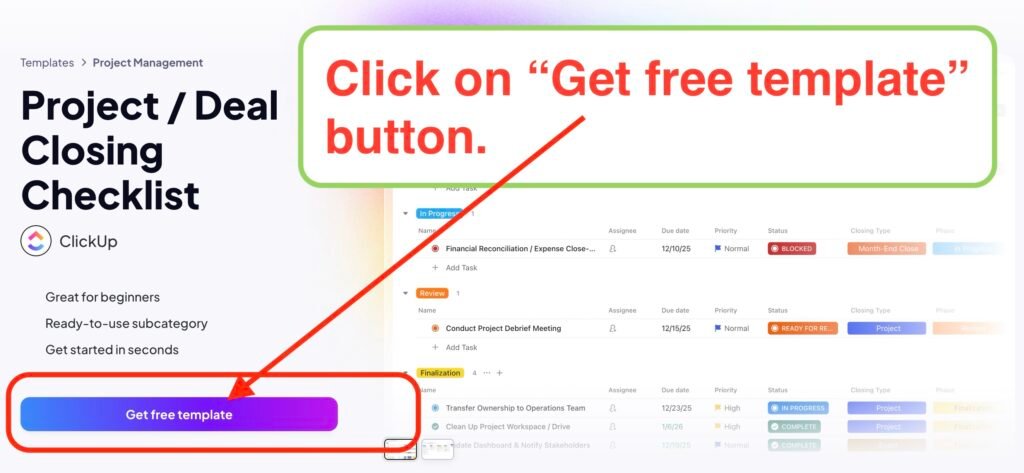
Step 2: Click on Get free template, as shown in image below.
Step 3: Scroll down to find Blog Planner Template by Clickup, and then click on it.
Step 4: Click on the Get free template button.
Step 3: Click on “Continue with Google” button, as in image below.
Step 6: Now, select according to your need: you can select work as in image below.
Step 7: Select what you want to manage.
Step 8: How did you hear about clickup: select like Fb, instagram.
Step 9: You can invite people if you want, and or click “I m done”.
Step 10: Select tools you already using and click “Next”.
Step 11: Choose the features you are interested in and click on Next.
Step 4: You choose the correct options and fill details , then click on Finish.
That’s it. Your digital blog-office is ready!
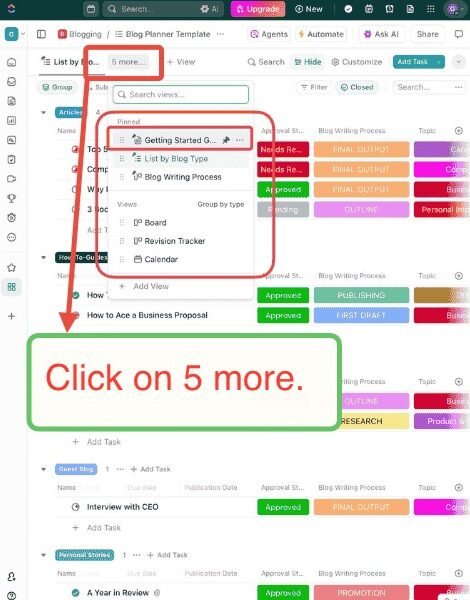
Click on this tab “5 more”, it will open a drop down containing many options like Blog writing process, Calendar, Guide, Tracker, etc.
we will click the Getting Started Guide option.
In this “getting started guide” you will learn how can you use this template to easily manage your blog and even your team(if you have one).
There are many Views in this template and you can create your own.
We can not share complete guide here because of copyright issues,
make sure you create this blog-office and get this guide to know how can you use manage blogging
After this, you can Automate your blog tasks and become free for most work.
Let’s move to the next part –
Part 2: Blog Automation.
But,
If you have not started yet click on the button below to start creating this blog-office, then only you will be able to automate.