


Model Context Protocol — A clear beginner’s guide (learn, build, and write about it)
This long-form guide explains, in simple steps, what the Model Context Protocol (MCP) is, how to begin building MCP servers and clients, how to use the popular mcp-agent framework, and — uniquely — how you can write articles, guest posts, or tutorials about MCP to earn money.
The goal is practical: by the end you will have a tested demo idea, a working outline for a blog post, and a list of places to publish that pay for technical articles.
Section 1 · What MCP is
What the Model Context Protocol actually is — in plain language
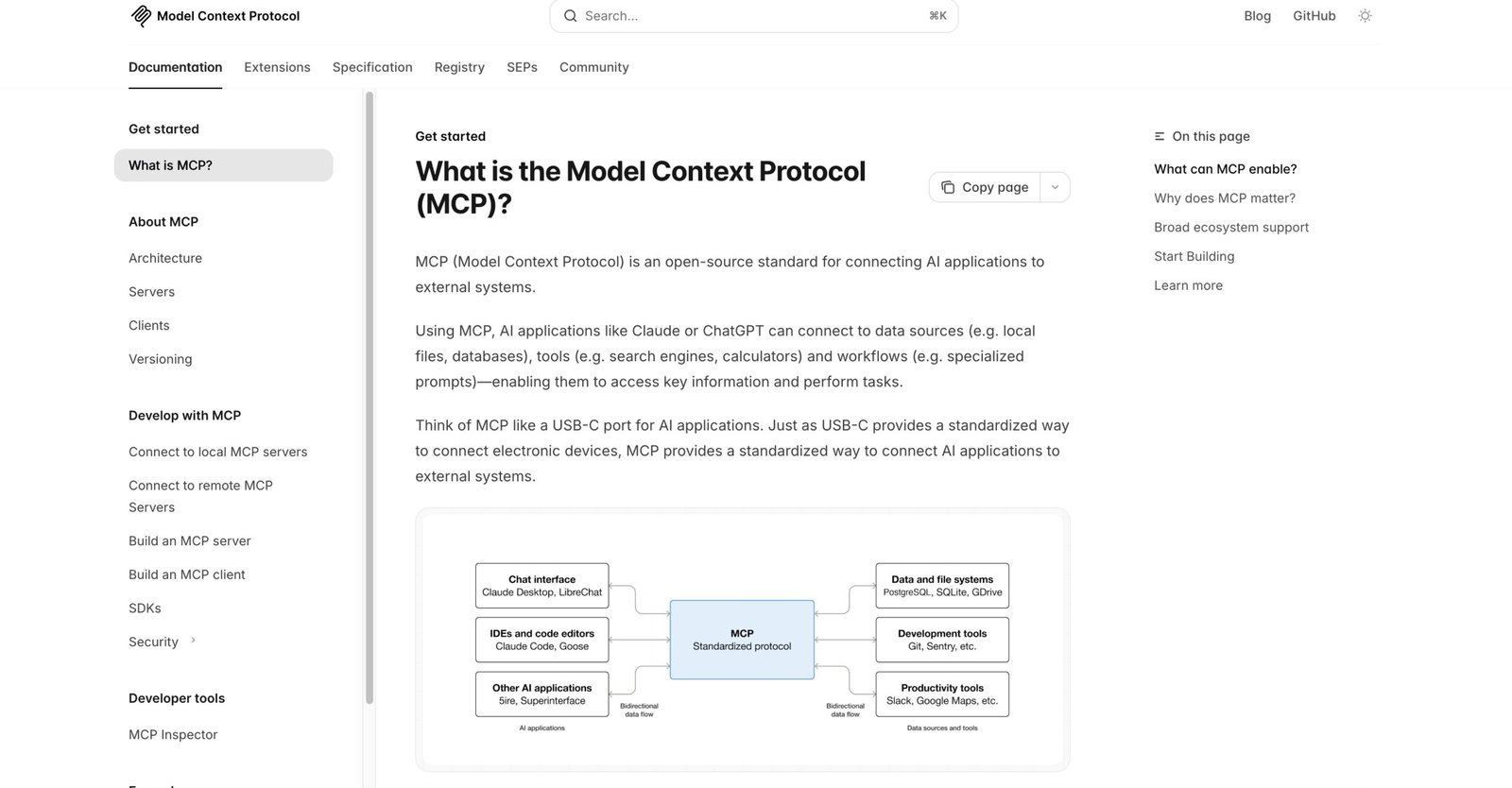
At its simplest, the Model Context Protocol (MCP) is a standardized, open protocol that lets AI models (large language models / LLMs) connect to external data sources, tools, and workflows in a consistent way. If you think of an AI model as the “brain”, MCP is a standard that lets that brain plug into “tools” like a file reader, a search engine, a calendar, or a GitHub repo — safely and predictably.
MCP is not a single product. It’s a spec, plus a growing set of reference servers, client libraries, and community tools. Because it is a standard, multiple AI platforms and tooling ecosystems can implement it once and then use the same servers across models.
Core idea (one sentence)
MCP defines how to describe and expose tools and data to a model so the model can ask for them and act on them.
Tools exposed via MCP can include: file access, database queries, webhooks, human prompts, calculators, or small units of code that perform actions.
Why the standard matters
- Interoperability — write a server once and many AI clients can use it.
- Security boundary — servers can control what models can access and what actions they can take.
- Developer productivity — building tools against one spec is faster than many proprietary integrations.
Section 2 · Why it matters
Concrete examples — what MCP makes possible today
These short examples show how MCP is useful in real scenarios. Each example below can be turned into a small demo you can blog about.
Example: Smart code assistant for a repo
Instead of copying files into a model prompt, an MCP server can expose a repository’s files, search index, and CI status. An LLM-powered agent can ask “show me failing tests for PR #42” and the server returns only the requested snippets. That reduces prompt size, improves privacy, and makes answers reproducible.
Example: Personal knowledge base + agent
An MCP server can safely expose selected notes, PDFs, and calendars to your assistant. The assistant can then draft emails using your calendar context, create tasks, or fetch a passage from a research PDF — all while the server enforces access control.
Example: Automating tasks across SaaS tools
Expose small, auditable “actions” (like “create-ticket”, “send-invoice”) through MCP. Agents can compose those operations into workflows: for example, summarise today’s tickets and create a draft reply for approval.
Why this is timely
Major AI platforms and tooling providers are adopting or supporting MCP-style standards, which means learning MCP puts you at the center of a fast-moving developer ecosystem.
Section 3 · MCP basics
The building blocks — servers, tools, capabilities, and clients
MCP intentionally separates concerns. The usual pieces you’ll meet are:
- MCP Server — exposes capabilities and data. It describes “tools” (endpoints) the model can call.
- MCP Client — used by the model or agent runtime to discover servers and call capabilities.
- Capabilities / Tools — small, typed units exposed by servers (search, file read, send email, prompt for human input).
- Schema & Discovery — a typed description tells clients how to call a tool and what responses look like.
Data flow (simplified)
1) The client sees a tool described in MCP. 2) The client asks for permission or context. 3) The tool runs and returns structured data. The model then uses that data to produce better answers or to take the next action.
Common terms
| Term | Plain meaning |
|---|---|
| Tool / Capability | A callable operation exposed by a server (e.g., search, run job, get-file) |
| Session | A live interaction between a client/agent and a server for a given user or purpose |
| Schema | The TypeScript/JSON schema that documents tool inputs and outputs |
Section 4 · mcp-agent (practical)
Use mcp-agent to build agents faster — quickstart + example
The mcp-agent project is a community framework (see the GitHub repo) that helps you wire up MCP servers and LLM-based agents with minimal boilerplate. It handles sessions, durable state, and common workflows so you can focus on the business logic.
Why start with mcp-agent?
- Abstracts protocol-level details (so you can prototype faster).
- Includes examples and patterns for common agent tasks.
- Active community and useful utilities for testing and evaluation.
Mini quickstart (conceptual)
- Clone lastmile-ai/mcp-agent.
- Follow the repo README to install dependencies and run a sample agent locally.
- Connect the agent to an MCP server (either an example server or your own).
- Try a canned flow: ask the agent to summarize a README or fetch recent issues from a repo.
Example outline for a blog post demo
- Goal: Build an agent that opens a GitHub issue when a test fails.
- Show MCP server exposing a “check-ci” tool and a “create-issue” tool.
- Wire the agent (mcp-agent) to call the tools based on LLM decisions.
- Demonstrate end-to-end: failing test → agent sees failure → agent opens issue → confirmation message.
Section 5 · Build a minimal MCP server
Step-by-step: a tiny MCP server that exposes one tool
This section gives a conceptual step-by-step you can follow and turn into a tutorial or a long-form article. The exact commands depend on the SDK you choose (Node.js, Python, Rust). Check the MCP docs for SDK-specific quick starts.
Step 0: prerequisites
- Node.js >= 18 (or Python 3.10+, depending on SDK)
- Git and GitHub account
- Basic familiarity with REST and JSON
Step 1: create a repo and project
Initialize a new project and add a README describing the server’s single capability (for example, summarize-pdf).
Step 2: define your capability schema
In MCP, you describe how a tool is called and what it returns. Use the official TypeScript-first schemas as a reference. A minimal schema includes input fields, output fields, and any permission metadata.
Step 3: implement the handler
Write the logic that runs when the tool is called. Keep output deterministic and structured (for example, return a JSON object with summary and source).
Step 4: run and test
Run the server locally. Use the MCP test clients or an example agent to call your tool and verify the shape of responses. Add basic unit tests for the handler and schema validation.
Step 5: add authentication & permissions
Implement a basic token-based auth or an allowlist so only trusted clients can call destructive tools. Document how tokens are revoked.
Section 6 · Security & privacy
Best practices so your MCP server isn’t a risk
Because MCP servers can expose powerful actions, security and privacy are first-class concerns. The following are minimal but critical steps:
- Least privilege: only expose the exact data and actions needed for the client task.
- Authentication: require tokens and rotate them; provide scoped tokens for different clients.
- Auditing: log actions and maintain an audit trail for any operation the model triggers.
- Human-in-the-loop for destructive ops: require explicit confirmation for any action that mutates external systems.
- Sanitize outputs: ensure the server’s responses never leak sensitive data not required by the task.
Add clear documentation describing which user data is stored, how long it is kept, and how users can request deletion.
Section 7 · Testing & production readiness
Checklist before you say “this is production-ready”
- Unit tests for handlers and schema validation
- Integration tests using
mcp-evalor equivalent - Rate limiting, quotas, and sane timeouts
- End-to-end test that the agent only gets the fields it needs
- Deployment plan and rollback strategy
Section 8 · How to write about MCP and earn money
Turn your MCP learning into paid articles, tutorials, or guest posts
There is strong demand for clear, practical guides on MCP because: 1) it’s emerging, 2) it’s technical but approachable, and 3) there’s an active developer community. Below are concrete ways to convert your technical work into income.
Step A — Choose the right angle (buyers want useful outcomes)
Pick an outcome-focused topic like “How to build an MCP server that exposes a Jira helper” rather than “What is MCP?” Editors and paying outlets prefer tutorials that help readers accomplish a task.
Step B — Produce a high-quality canonical piece
- Write a thorough tutorial (1,500–3,500+ words) with runnable code and a GitHub repo.
- Create a short demo video or GIF to show the agent in action.
- Provide a downloadable sample (e.g., a small Docker Compose) for readers to run locally.
Step C — Where to publish and how much you might earn
There are several publication strategies:
- Personal blog / Medium / Dev.to: Good for building samples and backlinks; Medium Partner Program can earn modest revenue based on reading time.
- Technical outlets (paid): Many outlets pay flat fees for tutorials — research the submission guidelines before pitching (examples below in the Resources section).
- Company blog or sponsor post: If your demo uses an open-source project, the project maintainers or companies in the space sometimes sponsor a tutorial.
- Paid newsletters & technical magazines: These can pay more for deep, proven tutorials; consider repurposing content into a newsletter series.
Step D — Reuse: turn one tutorial into many products
- Write a long-form tutorial for a tech blog (paid).
- Publish a shorter step-by-step on Dev.to or Medium linking to the paid piece.
- Create a short video course or workshop and sell it on Gumroad or through a community.
- Offer a consulting “quick build” service based on your tutorial (e.g., set up an MCP demo for a team).
Section 9 · Titles, outlines, and pitch templates
Ready-to-use titles and a pitch template you can copy
Effective titles (starter list)
- “How I built an MCP server that summarizes a GitHub repo (step-by-step)”
- “Build a personal agent with MCP and mcp-agent — a beginner’s guide”
- “Secure MCP servers: practical patterns for real-world deployments”
- “MCP for product teams: automating triage and issue creation”
- “From zero to working demo: MCP, Docker, and mcp-agent in 30 minutes”
Pitch template (email or submission form)
Subject: Pitch — “How I built an MCP server that summarizes GitHub PRs” (tutorial + repo)

Hello [Editor Name],

I’d like to pitch a practical tutorial titled “How I built an MCP server that summarizes GitHub PRs (step-by-step)”.

Why it matters:
- Helps developers add a provable, auditable assistant to their workflow that extracts PR context.
- Shows an end-to-end demo (code + Docker Compose) and uses the mcp-agent framework.

Outline:
1) Problem: PR noise and slow reviews.
2) Tools: MCP server (summarize), mcp-agent client, sample repo.
3) Step-by-step: schema -> handler -> agent wiring -> run demo.
4) Security checklist and testing.
5) Final notes and next steps.

Samples:
- My working sample repo: https://github.com/YOURNAME/mcp-pr-summarizer
- Other published writing sample: https://dev.to/YOURNAME/mcp-mini-tutorial

I can deliver a 1,800–2,800 word tutorial with images and a runnable repo in 2 weeks.

Thanks,
[Your Name] — [Short bio and links to GitHub/Twitter/LinkedIn]
Where to pitch (short list)
- Dev.to (great for initial exposure)
- freeCodeCamp News (tutorials)
- Medium publications (technical pubs)
- Target trade/technical blogs — see Resources below for ideas
Section 10 · Resources & links
Essential links to read, clone, or follow
Bookmark these. They include official docs, repos, community hubs, and useful tutorials.